
How to review AI-generated code
What five studies say about AI-written code, ten review practices with sources, a checklist, and one real ticket reviewed hour by hour.
On this page
- What does the research say about AI-generated code?
- Why is reviewing AI code different from reviewing a colleague's code?
- What are the best practices for reviewing AI-generated code?
- What does a review round look like on a real ticket?
- What should an AI code review checklist include?
- Which approaches to AI code review exist?
- How do you set this up for your team?
- Frequently asked questions
Short answer: review AI-generated code against the task it was meant to solve, not just the diff. Keep each change small, have it reviewed by someone — or some agent — other than its author, run the whole test suite rather than only the tests that came with the change, check security-sensitive paths on purpose, and follow the review with a test of the promised behaviour. The research below explains why each step matters, and a real ticket shows what the process looks like hour by hour.
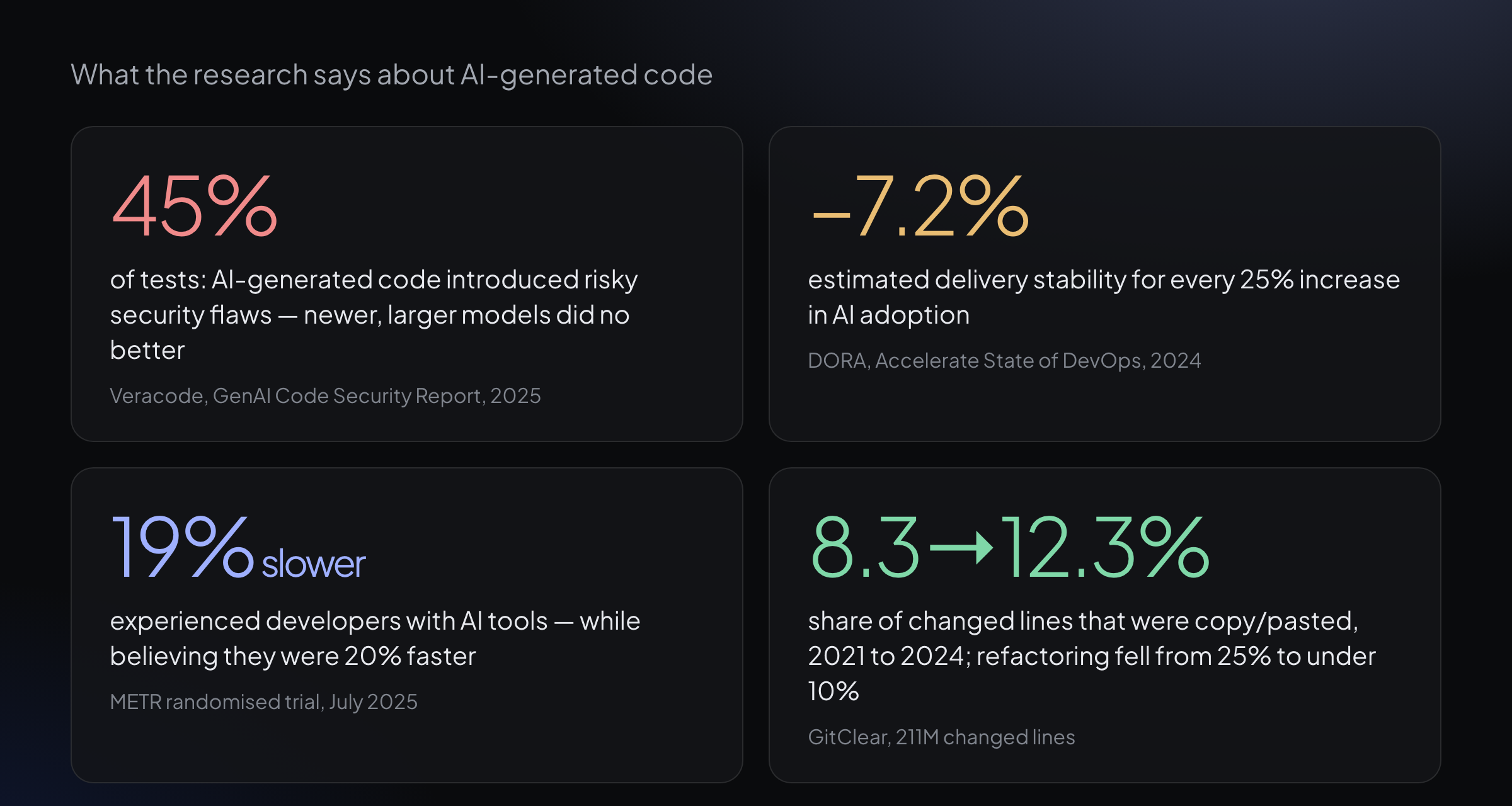
Four findings that shape how AI-written code should be reviewed. Each study is linked in the section below.
What does the research say about AI-generated code?
The evidence so far points in one direction: AI makes writing code faster and makes reviewing it more important. Five studies are worth knowing before you design a review process.
| Source | What was measured | Finding |
|---|---|---|
| DORA, Accelerate State of DevOps 2024 (Google Cloud) | Survey-based model of AI adoption and delivery performance | For every 25% increase in AI adoption, delivery stability was estimated to fall by 7.2% and throughput by 1.5% — while code review speed rose 3.1% and code quality 3.4% |
| Veracode, 2025 GenAI Code Security Report | Security of code produced by 100+ language models across Java, JavaScript, Python and C# | AI-generated code introduced risky security flaws in 45% of tests; larger, newer models did not do better |
| Perry et al., Stanford, ACM CCS 2023 | Controlled study of 47 participants writing security-related code with and without an AI assistant | Participants with the assistant wrote significantly less secure code — and were more likely to believe it was secure |
| METR, July 2025 | Randomised trial, 16 experienced open-source developers, 246 real tasks | With AI tools they took 19% longer; beforehand they expected a 24% speed-up and afterwards still believed they had been 20% faster |
| GitClear, AI code quality research | 211 million changed lines, 2020–2024 | Copy/pasted lines rose from 8.3% to 12.3% of changes; lines associated with refactoring fell from 25% to under 10% |
Read together, these results describe three risks a review has to absorb. The code arrives in bigger batches, which DORA ties to lower stability. It looks finished while carrying defects a quick read misses — the Veracode and Stanford results. And people overestimate both its quality and their own speed, as the Stanford and METR studies show. Each of the practices below targets one of those risks.
Why is reviewing AI code different from reviewing a colleague's code?
When a colleague opens a pull request, you can ask them why they made a choice, and their reasoning usually survives in the commit history, the ticket and the conversation around it. Microsoft's study of modern code review, Bacchelli and Bird (ICSE 2013), found that understanding the change is the central need of a reviewer — and that reviews deliver as much in knowledge transfer and team awareness as in caught defects.
AI-generated changes weaken both sides of that. The author's reasoning is often gone the moment the session ends, so the reviewer has to rebuild it from the ticket and the code. And the volume grows: agents open pull requests faster than a team can read them, so a review process that depended on a person's spare attention stops working at exactly the moment it is needed most.
The practical consequence is that the review has to be designed, not left to habit. Anthropic's guide to building effective agents describes the same shape as an evaluator–optimizer loop: one model produces the work while another evaluates it against clear criteria and sends back feedback. The criteria are what make the loop useful — which is why the first practice below starts with the task, not the code.
What are the best practices for reviewing AI-generated code?
1. Review against the task, not only the diff
A diff shows what changed. It does not show whether the change does what was asked, or what it should have touched and didn't. Start every review from the ticket's acceptance criteria — the conditions that must hold when the work is done — and check the change against each one. If the ticket has no criteria a second reader can check, fix the ticket first: a reviewer cannot verify a goal nobody wrote down.
2. Keep each change small enough to read properly
The best-known industry data on review effectiveness comes from a SmartBear study of a Cisco Systems team: reviewers found defects most effectively at 200–400 lines per review, at under 500 lines an hour, in sessions of 60–90 minutes — conditions under which reviews caught an estimated 70–90% of defects. DORA's 2024 report makes the same point from the delivery side: the downside of AI adoption shows up when teams drift away from small batch sizes. Split large agent-generated changes before reviewing them, not after.
3. Never let the author approve its own change
A model reviewing its own output brings the same assumptions to the review that it brought to the code, and the Stanford study shows that people working with an assistant are less able to see the gap. The rule that works is structural: the agent or person who wrote the change may submit it, but cannot be the one who passes review. Make it a property of the tool, not a guideline someone can skip at 2 a.m.
4. Run the whole suite, not just the tests that came with the change
Agent-written changes often ship with their own tests, and those tests usually pass — they were written by the same author with the same blind spots. Defects live where the new code meets the rest of the system: a registry that should have been updated, a contract another module relies on, a shared check the new code quietly breaks. Run the full suite, and confirm on the main branch whether a failure is new or pre-existing before you attribute it.
5. Check security-sensitive paths on purpose
Veracode's results — risky flaws in 45% of tests, with no improvement from larger models — mean security cannot be assumed to come for free. Read authentication, authorisation, input handling, secrets and data access as a separate pass, and back the review with static analysis and dependency scanning rather than relying on a general read-through.
6. Look for duplication and missed reuse
GitClear's data shows copy/paste growing and refactoring shrinking as AI assistance spreads. In review, ask whether the change re-implements something the codebase already has, and whether two near-identical blocks should be one. This is the cheapest moment to stop the duplication that becomes tomorrow's maintenance cost.
7. Write the verdict in words, and keep it actionable
Google's public code review standard asks reviewers to approve a change once it clearly improves the overall health of the code, even if it isn't perfect, and to let technical facts and data outweigh opinion. For AI-written code the verdict should be explicit: pass or changes requested, the blocking issue and its root cause, the fix where it is obvious, and what is good and should not change in the next round.
8. Send the fix back to the same change
When a review requests changes, the fix belongs on the same branch and the same ticket, with the verdict attached. A fresh pull request loses the context, reopens settled questions and makes it impossible to see what the second round actually checked.
9. Follow review with a test of what was promised
Code review asks whether the change is right. Quality assurance asks whether it does what the ticket promised, the way someone will actually use it. For a screen, that evidence is screenshots; for everything else, it is the real requests and their output — attached to the ticket, not summarised in a sentence.
10. Measure outcomes, not the feeling of speed
The METR trial is a warning about intuition: developers felt faster while measurably slower. Judge your review process by delivery outcomes — changes that had to be reverted, defects found after release, how often a change bounces between rounds — rather than by how quickly pull requests seem to close.
What does a review round look like on a real ticket?
The example comes from YATFA's own work: ticket YATFA-3370 on 8 July 2026, which added a terminal command listing the agent containers running on a machine together with what each one is doing on the server. It touched two repositories — a new API endpoint and the command-line tool that reads it — and followed practices 1, 3, 4, 7, 8 and 9 above.
| Time (UTC) | Step | What happened |
|---|---|---|
| 05:17 | Ticket filed | Two phases, explicit acceptance criteria, an explicit out-of-scope list |
| 05:22 | Ticket confirmed | The ticket's technical claims were checked against the codebase before any code was written |
| 06:00 | First submission | Two pull requests open; the endpoint's own tests pass, 22 of 22 |
| 09:53 | Review: changes requested | One blocking regression, with its root cause and the exact one-line fix |
| 10:05 | Fix pushed | The fix lands on the existing branch — no new pull request |
| 12:22 | Review: passed | The fix is verified in the code and the test suites are re-run rather than taken on trust |
| 12:42 | QA: passed | Both phases exercised end to end against a live server |
| 12:51 | Approved | The load-bearing claims are re-checked before sign-off |
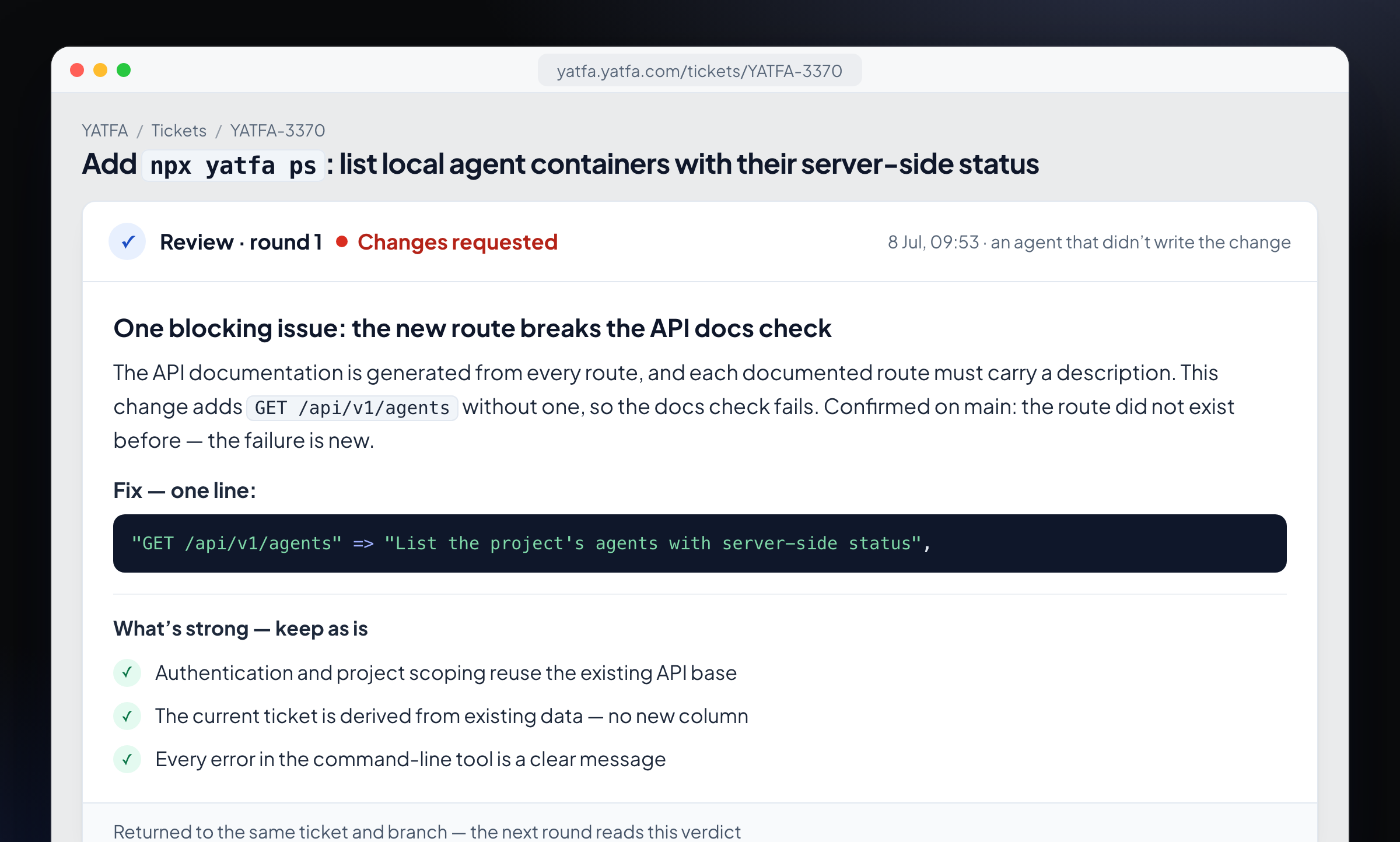
The first review round: one blocking issue explained in words, the fix spelled out, and the parts that should not change.
The new endpoint worked, and its own tests passed. The defect sat outside it: the project generates its API documentation from every route, and a separate test requires each documented route to carry a description. The change added a route without one. The review ran the wider suite instead of only the new tests, confirmed on the main branch that the route had not existed before — so the failure was introduced by this change — and wrote a verdict that could not be misread. In the words of the review: "a single missed registration entry is all that stands between this and a pass."
The one-line fix was pushed to the same branch twelve minutes later. The second round did not trust the rework note: it checked the entry in the code and re-ran the documentation tests (14 of 14), the endpoint's tests (22 of 22) and the whole API suite (538 examples, 0 failures). QA then built a fixture project, called the endpoint with missing, wrong and valid keys, confirmed that one project's data never appeared in another's, and ran the command-line tool through its error paths. There was no screen, so the evidence was the requests and their output, attached to the ticket.
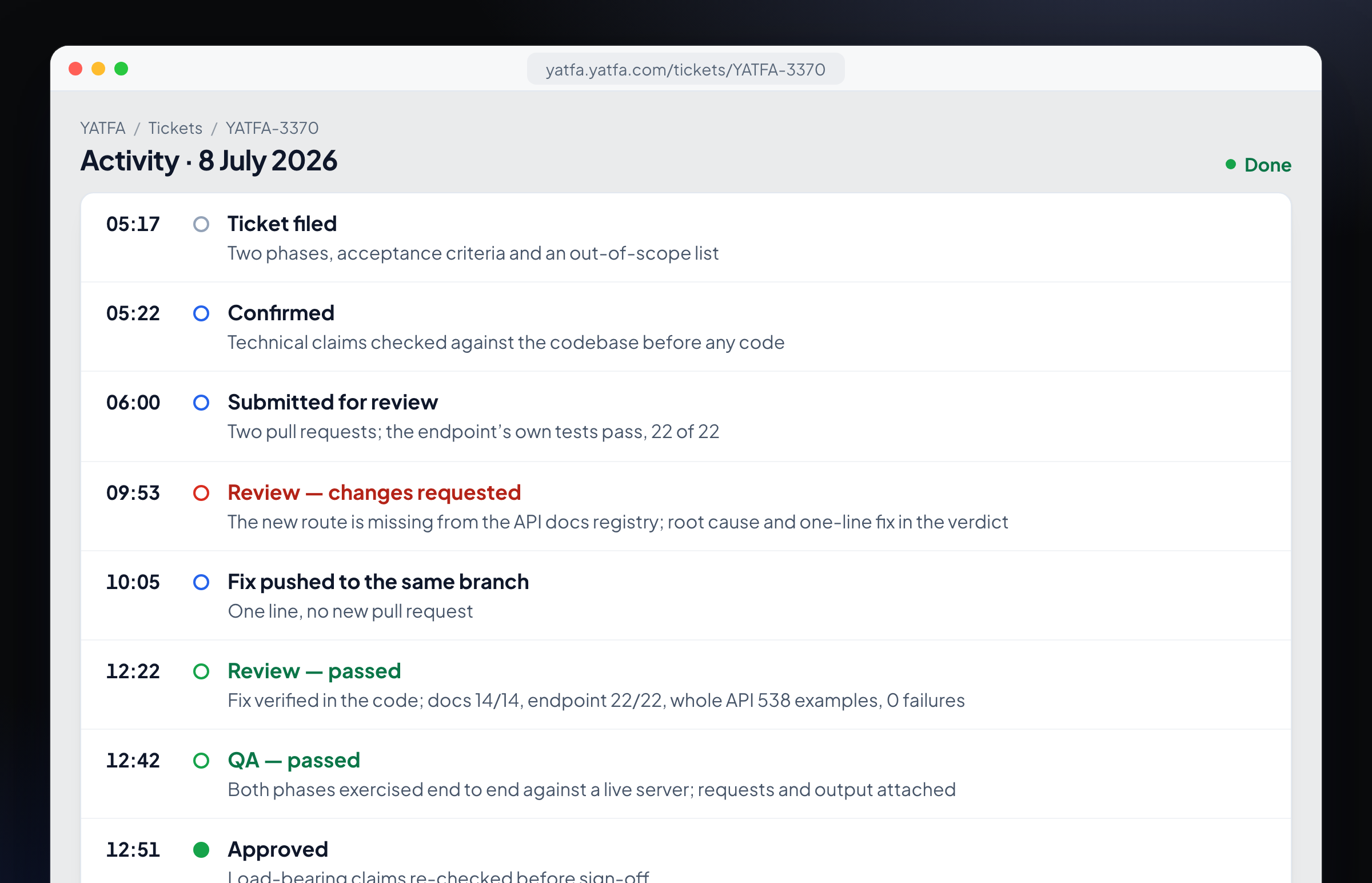
The same day as it reads on the ticket: every step is a recorded event with a time and a written outcome.
What should an AI code review checklist include?
| Check | Why it matters for AI-written code | What helps |
|---|---|---|
| Does the change meet every acceptance criterion? | The code can be correct and still solve a different problem | Criteria a second reader can verify, written before the work starts |
| Is the change small enough to read in one sitting? | Review effectiveness drops with size; AI makes large batches cheap | Splitting work into slices before it is written |
| Did someone other than the author review it? | Self-review repeats the author's blind spots | A review step the author cannot pass |
| Does the full test suite pass, not just the new tests? | Defects hide where new code meets the system | Running the whole suite in review |
| Were security-sensitive paths read on purpose? | AI code carries security flaws at a high rate | A separate security pass, static analysis, dependency scanning |
| Does it duplicate something that already exists? | AI favours writing new code over reusing old | Searching the codebase for the same logic |
| Is the verdict written, with reasons? | A bare approval or rejection cannot be acted on | A verdict template: blocking issue, root cause, fix, keep |
| Was the promised behaviour tested and evidenced? | Passing review is not the same as working for the user | QA against the ticket, with screenshots or request output |
Which approaches to AI code review exist?
| Approach | Examples | Who reads the change | What happens after a "no" | Typical blind spot |
|---|---|---|---|---|
| Suggestions in the editor | Assistants inside the IDE | The same assistant that helps write the code | Nothing is blocked; you decide in the moment | Shares the author's context and assumptions |
| A review bot on pull requests | GitHub Copilot code review, CodeRabbit, Greptile | A model that comments on the diff | The author may address the comments or not | Strong on the diff, weaker on the system around it |
| A review step built into the workflow | YATFA, custom pipelines | A different agent, reading the change against the ticket | The change cannot move on; it returns to the same ticket | Limited to what the ticket and code make explicit |
| Human review | Your team | A colleague | Depends on team discipline | Attention and time at volume |
These approaches are not mutually exclusive. A common combination is an assistant in the editor for writing, a review step that the author cannot skip, and human review reserved for changes that need judgment — architecture, product decisions and anything the automated steps flag.
How do you set this up for your team?
Start with the ticket. Write acceptance criteria that a second reader can check, because both the review and the QA pass work against them. Then make the separation structural: the author of a change cannot pass its review, and that rule lives in the tool. Require the verdict as text, store it on the ticket, and keep fixes on the same branch so the history of the change stays in one place.
Finally, decide how far work may go without a person, and write that decision down as a setting rather than a habit. In YATFA this is a per-project autonomy setting: small, safe work is approved by an agent at every level, larger work waits for you until you switch it over, and reviewed, QA-checked changes either wait for your decision or go through — enforced by the server rather than by an instruction to a model. The code review and automated QA pages show both steps in detail.
Frequently asked questions
Can the same AI model review its own code?
It can produce comments, but it is a weak check: the review shares the author's context and assumptions, and controlled studies show that people working with AI assistants overestimate the security of the result. A different reviewer — another agent or a person — reading the change against the task catches the defects that live where the author was not looking.
Should a human still review AI-generated pull requests?
A person decides where their attention goes. With a separate review step and a QA pass in front of them, people can spend their time on changes that need judgment rather than on the ones a structured check has already settled. How much reaches a person is a decision worth making explicitly, per project.
How many lines should one review cover?
The industry guideline from the SmartBear and Cisco study is 200–400 lines per review, at under 500 lines an hour, with defect detection dropping beyond that. Agent-generated changes should be split to fit, rather than reviewed as one large batch.
What should an AI code review comment contain?
A verdict (pass or changes requested), the blocking issue with its root cause, the fix where it is obvious, and what is good and should not change. A comment without a verdict, or a verdict without reasons, cannot be acted on in the next round.
Is AI-generated code less secure than human-written code?
Research suggests it needs deliberate security review. Veracode found risky flaws in 45% of its tests across more than 100 models, and the Stanford study found that participants using an assistant wrote less secure code while feeling more confident about it. Treat security as a separate pass, not part of a general read-through.
The YATFA team builds an engineering organization around AI coding agents: work found in your codebase, review by an agent that didn't write the change, QA with proof, and knowledge that stays current. See how code review works in YATFA, or start free.
Terms in this article
Keep reading
Testing AI-generated code: why green tests are not enough
Research on weak tests and false greens in AI coding benchmarks, what to verify beyond a passing suite, and a ticket where QA caught what specs missed.
Read the article →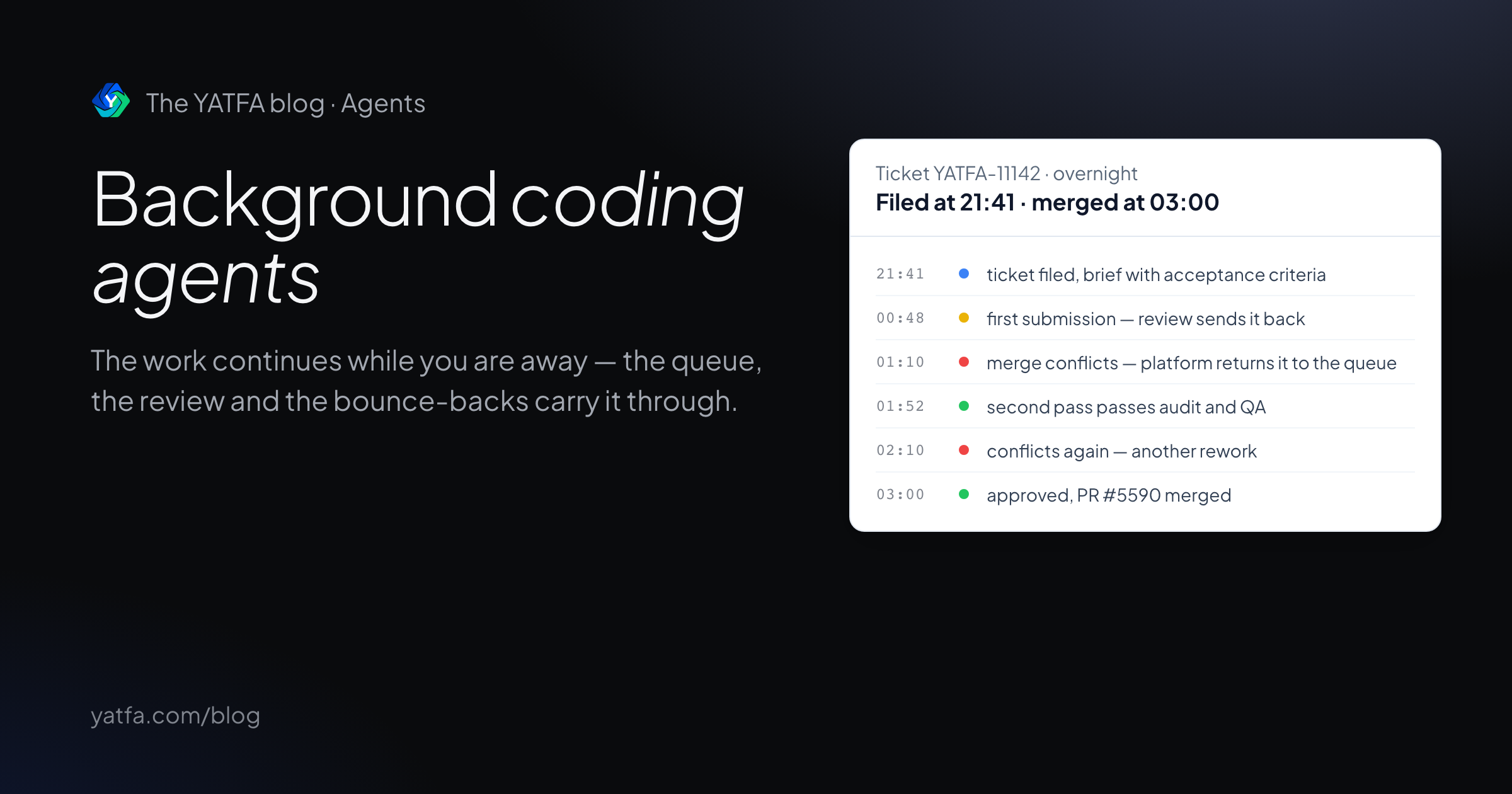
Background coding agents: how unattended work ships reviewed PRs
What happens between the task and the pull request, what the tools' own docs promise, and a ticket that passed review, bounced on merge conflicts, and merged overnight.
Read the article →